



Keeping a Linux system secure can be challenging, especially as vulnerabilities emerge daily, which is why choosing the right Linux security tools is essential.
Linux patch management software plays a critical role in protecting your systems by ensuring timely updates, automating patch deployment, and minimizing security risks, as explained by CIS Controls for secure systems.
In this article, we’ll explore how this software works, why it’s essential, and the best practices for maintaining a secure Linux environment.
What Is Linux Patch Management Software?
Patch management software for Linux is a tool designed to help system administrators identify, test, and deploy patches across Linux servers and devices. Patches are updates that fix security vulnerabilities, bugs, or performance issues. Without proper patching, your systems remain exposed to potential attacks or operational problems.
Table of Contents
- What Is Linux Patch Management Software?
- Why Patch Management Is Critical for Linux Security
- Key Features of Linux Patch Management Software
- How a Patching System Improves Security
- Best Practices for Using Linux Patch Management Software
- Common Challenges and How to Overcome Them
- Top Linux Patch Management Tools
- Conclusion
- FAQ
Why Patch Management Is Critical for Linux Security
Even the most robust Linux systems can have vulnerabilities, which makes following Linux security best practices crucial.
Cybercriminals often exploit unpatched software to gain unauthorized access. Implementing a structured patching system provides several advantages:
- Proactive security: Regular patching ensures known vulnerabilities are addressed before they can be exploited.
- System stability: Updates fix bugs and improve overall performance.
- Regulatory compliance: Many industries require up-to-date software to meet security standards.
Key Features of Linux Patch Management Software
Modern Linux patch management tools offer a variety of features to make the patching process efficient and reliable:
- Automated scanning: The software scans systems to detect missing patches or outdated software.
- Patch deployment: Patches can be automatically or manually deployed to multiple systems simultaneously.
- Reporting and compliance: Detailed reports help track patch status, audit compliance, and maintain accountability.
- Integration with existing tools: Many solutions work alongside configuration management and monitoring tools for seamless operations.
How a Patching System Improves Security
A well-implemented patching system does more than just install updates. Here’s how it strengthens security:
- Reduces attack surface: By fixing vulnerabilities, the number of potential entry points for attackers decreases.
- Prevents malware spread: Many malware strains exploit unpatched software. Regular updates help block these threats.
- Improves system reliability: Security patches often come with stability improvements that prevent crashes and downtime.
Best Practices for Using Linux Patch Management Software
To get the most out of Linux patch management software, follow these practical tips:
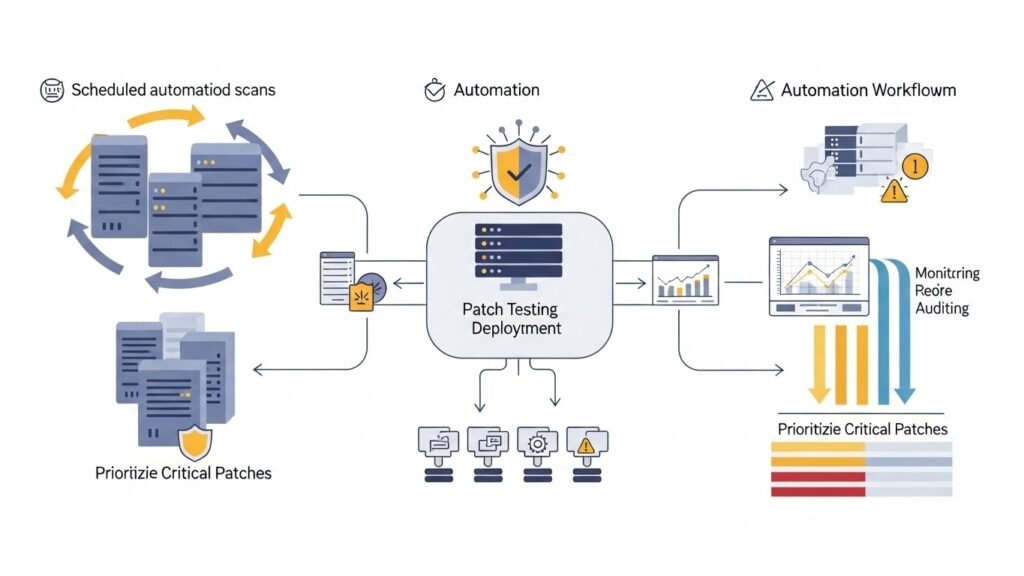
- Regularly schedule scans: Frequent vulnerability scans ensure no patches are missed.
- Test patches before deployment: Testing prevents unexpected conflicts or downtime.
- Automate where possible: Automation reduces human error and ensures consistency.
- Monitor and audit: Keep track of all patching activities to ensure compliance and transparency.
Common Challenges and How to Overcome Them
Even with advanced patch management software for Linux, challenges may arise:
- System compatibility issues: Some patches may conflict with existing applications. Always test in a controlled environment.
- Patch delays: Delays in patching increase exposure risk. Automating deployment helps reduce delays.
- Resource constraints: Large environments may need careful scheduling to avoid performance issues during updates.
Top Linux Patch Management Tools
Several tools are widely used to manage Linux patches effectively:
- Red Hat Satellite: Ideal for managing Red Hat Enterprise Linux systems at scale, similar to other Linux system management tools.
- Canonical Landscape: Best suited for Ubuntu environments, offering centralized patch management.
- Spacewalk: Open-source solution for managing updates across multiple Linux distributions.
- ManageEngine Patch Manager Plus: Cross-platform patch management that supports Linux, Windows, and macOS.
Conclusion
Maintaining Linux system security is an ongoing effort, and Linux patch management software is an essential tool in this process. By automating updates, improving system stability, and reducing vulnerabilities, patch management ensures that your Linux environment remains safe, compliant, and reliable. Following best practices and leveraging the right tools makes patching less daunting and more effective.
FAQ
What is Linux patch management software?
It is a tool that helps identify, test, and deploy security and software updates on Linux systems, keeping them secure and up-to-date.
Why is patch management important for Linux?
Patch management is critical because it fixes vulnerabilities, enhances stability, prevents malware attacks, and ensures compliance with industry standards.
Can patching be automated on Linux?
Yes, most Linux patch management software allows automated scanning and deployment, reducing human error and ensuring timely updates.
Which Linux patch management tool is best?
The best tool depends on your environment. Red Hat Satellite, Canonical Landscape, and ManageEngine Patch Manager Plus are popular choices for enterprise environments.
How often should Linux systems be patched?
Ideally, systems should be scanned and patched regularly, typically monthly or as soon as critical security updates are released.






