



How Free Online File Sharing and Storage Services Keep Your Files Secure
Sharing files online has become part of everyday life. From sending work documents to collaborating with remote teams or simply backing up personal photos, people rely heavily on free online file sharing and storage services, often alongside free online collaboration tools for smoother workflows.
But with cyber threats, data breaches, and privacy concerns constantly in the news, one question naturally comes up: how safe are these free platforms?
The short answer is that most reputable free cloud storage services invest heavily in security, following widely accepted data encryption standards to protect user files.
While free plans do have limitations, modern platforms use advanced technologies to keep user files protected. In this article, we’ll explore exactly how free online file sharing and storage services keep your files secure, what security features really matter, and how popular options compare so you can make a confident decision.
Why File Security Matters in Online Storage
When you upload a file to a cloud service, you’re trusting that company with your data. That data may include business contracts, personal documents, creative work, or sensitive information. If security is weak, files can be exposed, altered, or even stolen.
Table of Contents
- Why File Security Matters in Online Storage
- How Free Online File Sharing and Storage Services Protect Your Files
- Understanding the Limits of Free Plans
- Google Drive vs Dropbox Comparison: Security Perspective
- What Makes a Secure File Sharing Service Free Plan Trustworthy?
- Best Free Cloud Storage for Sharing: What to Expect
- Common Security Myths About Free Cloud Storage
- Practical Tips to Keep Your Files Even Safer
- Frequently Asked Questions
This is why security is no longer just a “premium feature.” Even free users expect a reasonable level of protection. The good news is that competition among cloud providers has pushed security standards higher across the board, including on free plans.
How Free Online File Sharing and Storage Services Protect Your Files
Most well-known platforms follow similar security principles. The differences are usually in how advanced or customizable those protections are.
Encryption During File Transfer
When you upload or download files, they don’t travel across the internet as plain text. Secure services use SSL/TLS encryption, which scrambles data while it’s in transit. This prevents hackers from intercepting files on public Wi-Fi or unsecured networks.
Even free users benefit from this protection. It’s now considered a basic security standard.
Encryption at Rest
Once your files reach the provider’s servers, they are stored in encrypted form. This means that even if someone gains unauthorized access to the storage system, the files remain unreadable without encryption keys.
For most users, this behind-the-scenes encryption is one of the most important security layers offered by free online file sharing and storage platforms.
Account Authentication and Login Protection
Your account security is just as important as file encryption. Most services use:
- Strong password requirements
- Suspicious login detection
- Optional two-factor authentication (2FA)
Two-factor authentication is especially valuable, particularly when combined with features offered by best free password managers.
Even on a secure file sharing service free plan, enabling 2FA can drastically reduce the risk of account compromise.
Secure Sharing Controls
File sharing is convenient, but it can also be risky if links fall into the wrong hands. Secure platforms allow users to:
- Set view-only or edit permissions
- Restrict downloads
- Disable shared links at any time
- Limit access to specific email addresses
These controls ensure that sharing doesn’t mean losing control over your files.
Data Center Security and Redundancy
Behind the scenes, cloud providers store data in professionally managed data centers. These facilities use physical security, constant monitoring, and redundant storage systems.
Redundancy means your files are stored in multiple locations. If one server fails, your data is still safe and accessible.
Understanding the Limits of Free Plans
While free plans are secure, they do come with trade-offs. Storage space is limited, advanced sharing controls may be restricted, and customer support is often basic.
However, it’s important to understand that security itself is usually not compromised just because a plan is free. Most providers know that trust is critical, and security failures damage their reputation.
Google Drive vs Dropbox Comparison: Security Perspective
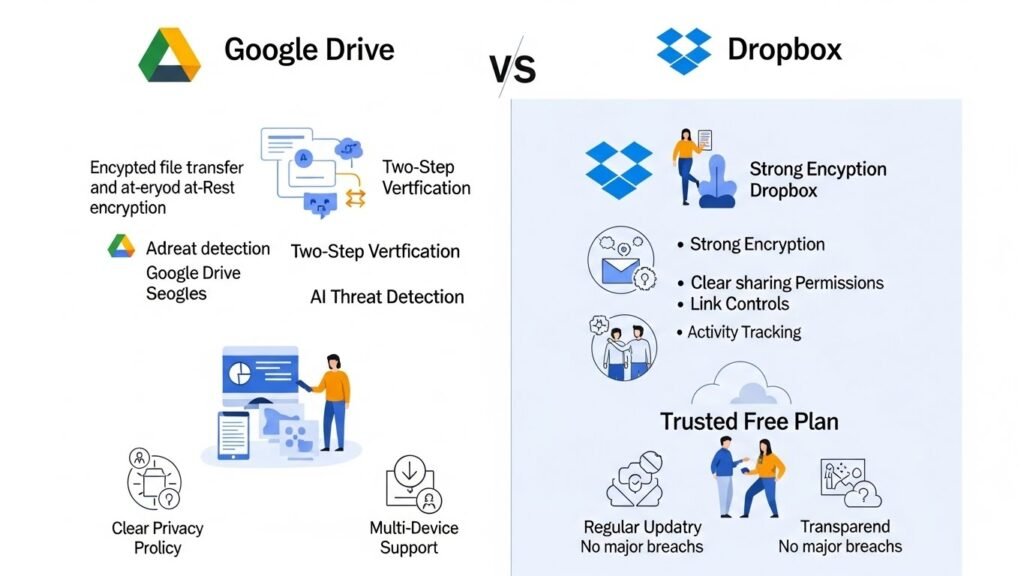
Two of the most popular platforms in this space are Google Drive and Dropbox. A Google Drive vs Dropbox comparison helps highlight how free services approach security differently.
Google Drive Security Overview
Google Drive benefits from Google’s massive infrastructure. Files are encrypted during transfer and at rest, and users can enable two-step verification.
Google also uses advanced AI systems to detect suspicious activity, phishing attempts, and malware. For everyday users, this automated protection adds an extra layer of confidence.
Dropbox Security Overview
Dropbox also uses strong encryption and secure authentication methods. It offers detailed sharing permissions and link controls, even on its free plan.
One advantage Dropbox users often mention is the clarity of its sharing settings, which makes it easier to avoid accidental oversharing.
Which Is More Secure?
From a pure security standpoint, both services are very reliable. Google Drive excels in automated threat detection, while Dropbox stands out for simple and transparent sharing controls.
For most users, the difference comes down to ecosystem preference rather than security gaps.
What Makes a Secure File Sharing Service Free Plan Trustworthy?
Not all free services are created equal. When evaluating options, look for these signs of a trustworthy platform:
- Clear privacy policy and data handling practices
- End-to-end or strong server-side encryption
- Regular security updates
- Transparent history with no major unresolved breaches
If a service is vague about how it protects data, that’s usually a red flag.
Best Free Cloud Storage for Sharing: What to Expect
The best free cloud storage for sharing combines ease of use with reliable security. You should expect:
- Simple sharing links with permission controls
- Secure access from multiple devices
- Basic activity tracking or notifications
- Consistent performance and uptime
Free plans are ideal for personal use, freelancers, students, and small teams with moderate sharing needs, similar to users who benefit from best free remote work tools.
Common Security Myths About Free Cloud Storage
“Free Means Unsafe”
This is one of the biggest misconceptions. Many free services use the same core security systems as their paid versions.
“Cloud Storage Is Less Secure Than Local Storage”
In reality, cloud providers often invest far more in security than individual users can at home or in small offices.
“Shared Links Are Always Public”
Most platforms allow you to restrict access, disable links, and manage permissions at any time.
Practical Tips to Keep Your Files Even Safer
Even the most secure platform benefits from responsible user behavior:
- Use strong, unique passwords
- Enable two-factor authentication
- Review shared links regularly
- Avoid uploading highly sensitive data without extra encryption
These simple habits significantly reduce risk.
Frequently Asked Questions
Is free online file sharing and storage really secure?
Yes, reputable services use encryption, secure data centers, and account protection features. While free plans have limits, basic security is usually strong.
Which is safer in a Google Drive vs Dropbox comparison?
Both are considered secure. Google Drive focuses on automated threat detection, while Dropbox offers very clear sharing controls. Neither is inherently unsafe.
What is the most secure file sharing service free plan?
The most secure free plans are offered by well-established providers with transparent security policies and regular updates.
Is free cloud storage safe for sharing work documents?
For non-confidential work documents, yes. Use permission settings and two-factor authentication to improve security.
What should I avoid storing in free cloud storage?
Avoid uploading extremely sensitive data such as unencrypted financial records or private identity documents unless you apply additional protection.
Free online file sharing and storage services have come a long way. With strong encryption, secure sharing controls, and professional infrastructure, they offer a safe and practical solution for everyday file sharing. By choosing reputable platforms and following smart security habits, users can confidently take advantage of the convenience these tools provide.






